As I explained in my previous blog , the default settings came with DD-WRT v24 micro version seemed unstable for the wireless connection. At first I tried to revert to the original Linksys firmware, but after I found out there was no way to go back, I tried various settings to test.
Now I believe that I have a fairly stable connection that I never experienced connection drop after I tuned the settings. I would like to share my settings with you so you can enjoy the DD-WRT.
The basic purpose of my tuning was to have a stable connection, not to have fancy functions. So I tried to disable all the functions that I found not necessary.
1. Rebooting the router daily automatically using Schedule Reboot.
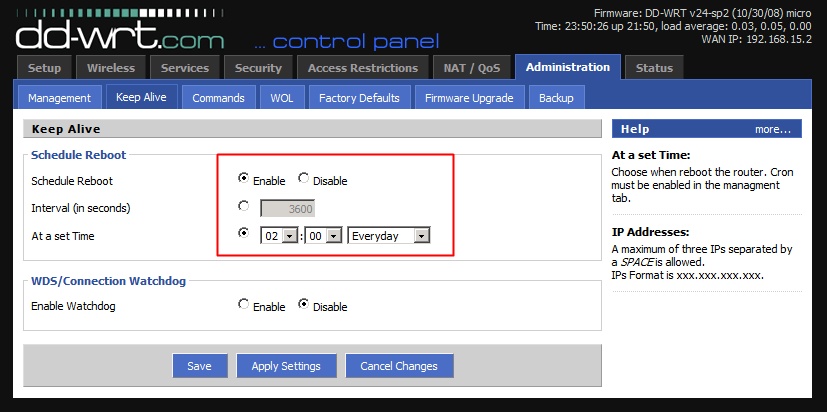
Somewhere on the DD-WRT site that someone is using this feature to reboot the router daily. I am not sure if this really helps to stabilize the overall router operation, but I think this could be a good way of maintaining fresh router state everyday resetting critical system resources such as memory.
2. Wireless Basic Settings
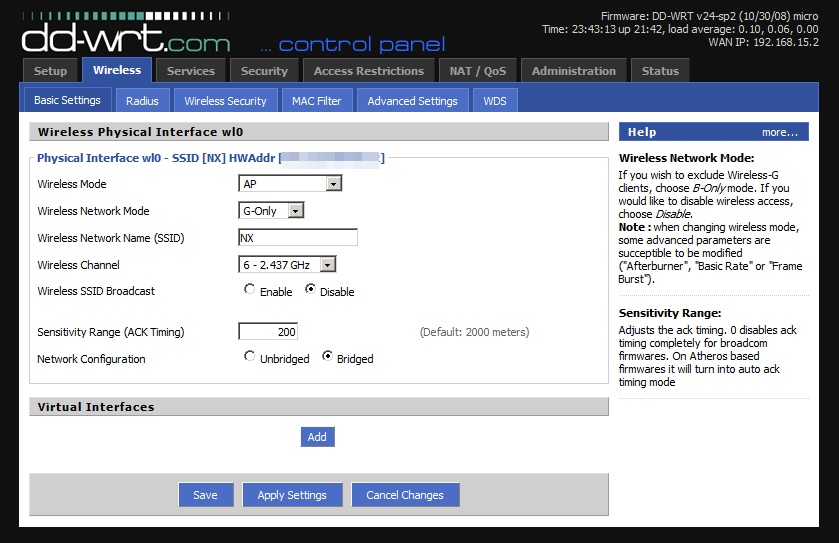
Basic Wireless Setting
- Wireless Mode should always be ‘AP’
- Wireless Network:If you use G only , select ‘G-Only’.
- Wireless Channel:You should select the one that used the least throughout the nearby routers within your area.
- Wireless SSID Broadcast:There is no reason to enable this. You don’t want others to see your SSID anyway.
- Sensitivity Range (ACK Timing) : The default value was 2000, but changed to 200. According to a forum entry, someone suggested to use the double value of the distance between your router and client. But I didn’t find any actual improvement on the wireless signal or connection status.
3. Wireless Security: Using WEP instead of WPA.
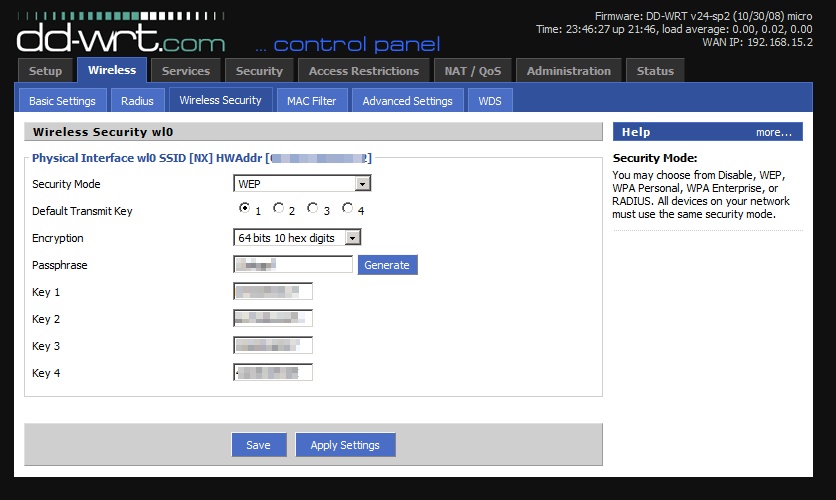
It appears that I would have unstable connection or slower speed with WPA. Perhaps, the problem is with my wireless client , but with WEP, everything was OK. So I decided to live with WEP and disabling SSID broadcasting. But beware if you are serious about the security, you should not use WEP at all.
4. Wireless Advanced Settings
Okay, now I will go over with the detail settings. This was the most important place to obtain the stable wireless connection.
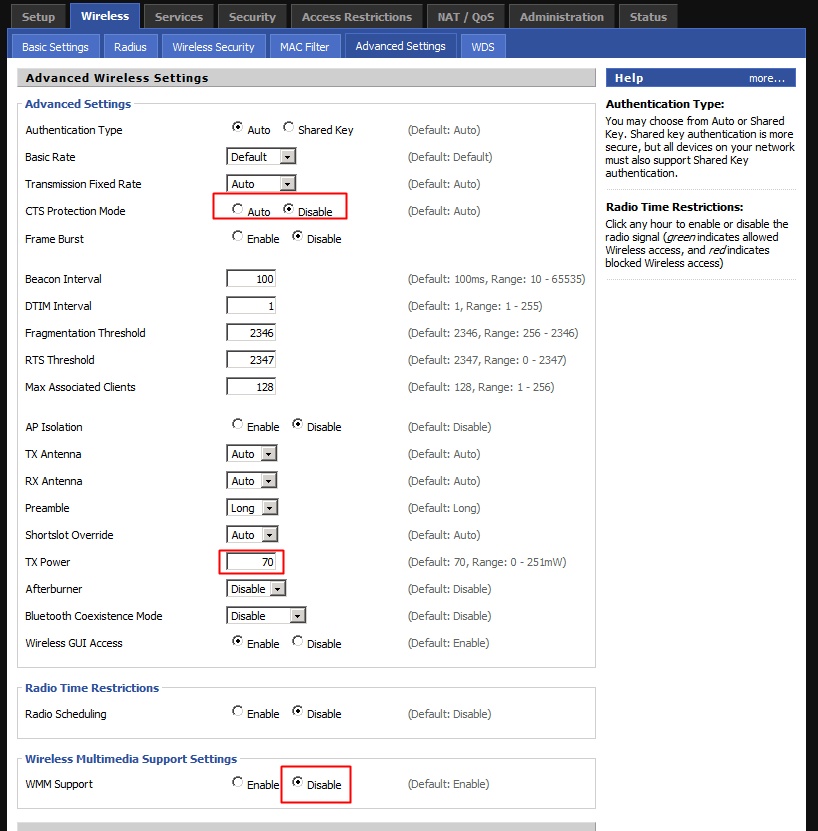
- CTS Protection Mode: This is something that is good when to use b and g togather. If you use g only, change this to Disable.
- Frame Burst should be Disable
- TX Power: Now this is one of the popular topic in the DD-WRT forum. This is related to transmission power and if you set this value too high, then the router may get burnt or won’t last its intended life span. The recommended max value is 70 which is the default. But please note that many users have said that increasing TX power does not boost the wireless signal that much. In fact, I did not see much difference either. So I decided to use the default.
- Wireless Multimedia Support Settings: This is something to do with QoS of multi-media. I’ve lived a great life with my previous router which didn’t have such functions so I decided to turn off the option. It was enabled by default.
So, now I am very satisfied and having a good time surfing Internet without the connection dropping. I think the important options for the stable connection were “Disabling CTS Protection Mode and WMM Support” in Wireless Advanced Settings menu. So if you experience the same problem, you should consider to change these options first.
Enjoy DD-WRT!
Hi, thanks for sharing this. I have a G2 with ddwrt in repeater bridge mode and the connection keep dropping. I will try your config. Hope this fix it.
@Xpost. I hope that my settings would help you improve your situation. Thank you.
Yes, it worked great but only in AP mode. During Repeater bridge mode, the connection keeps dropping every 2 min or less. Its very annoying! (maybe i have conflicts or something). I was hopping to use this router to expand my wireless net in the house, but I had no luck :(. Thanks any way
Hi, how do you determine that your connections are dropping? I think I’m having the same problem where I’m surfing the web and all of a sudden, everything just stops in firefox. It looks like it gets stuck loading the page and then after a while, I press the refresh button and the page then loads. Is this what you’re experiencing?
The other comment I wanted to make is that using WEP and hiding your SSID does nothing for security. The SSID can be easily picked up regardless of whether your router is broadcasting it or not. And, of course, WEP is so insecure it’s not even funny. Your best bet is to use WPA or WPA2 and have a password that is at least 19 characters with random characters (numbers, digits, punctuation chars) and you will be safe.
@chris , about WEP I heard it’s not safe at all. I will test with WPA or WPA2 tonight. Thanks.
About connection dropping, you may want to try ping remote server. I usually use ‘yahoo.com’. If ping and other internet connection is not working, you can suspect some wireless device failures. If you have other wireless devices, you can further test to confirm if the problem occurs at the router or at the particular wireless device.
Thanks. I will try that.
this was very helpful – thank you.