Change Log
- V 2.0 (7/23/2009) :
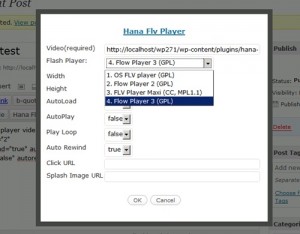
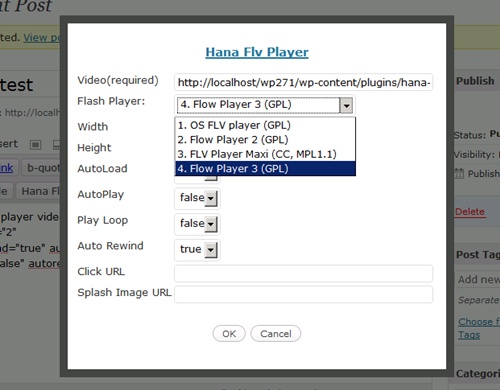
- For easier Hana Flv Video tag creation, new popup dialog is added. You can directly define the values using the form and click OK to create the tag. Please see the screenshot 4 for the example. The buttons in the editor will only appear for WP v2.5+
- v 1.8 (7/21/2009) :
- Fixed Minor bug with FlowPlayer v2 . It was not properly showing under IE7.
- FlowPlayer v3.1.1 player is added. Originally intended to upgrade the old version, but decided to leave old version due to some minor differences.
- v 1.7: Adding additional attributes for the players more advanced options. Also added a method to show FLV movie within the theme template files (such as sidebar.php)
- v 1.5: Adding FLV Player Maxi
- v 1.1: Lots of debuging.
- v 1.0: Initial Release with OS FLV (GPL) , FlowPlayer (GPL) flv players
Now you can easily embed the FLV Flash videos in your WordPress Blog. I have packaged the two GPL FLV Flash player, OS FLV and FlowPlayer. So you can use them freely without worries even for the commercial purpose unlike the JW player – If you have AdSense or display ads showing , you should purchase the player according to its website.
Flv Player MAXI
FlowPlayer V2
OS FLV
Flow Player V3

Installation
- Download and unzip the zip file. Upload
hana-flv-playerfolder with all of its contents to the/wp-content/plugins/directory - Activate the plugin through the `Plugins` menu in WordPress Admin Interface.
- Adjust the default settings in the ‘Settings’ menu in the Admin Interface if you want to.
- Use [hana-flv-player video=’…’ /]in your blog article. Attribute `video` is the only mandatory item where you define the video file. It can be full URL or absolute or relatvie path.
If you want a quick test and see if it’s working fine, goto Hana Flv Player settings admin page and copy the example shown in the bottom and paste in your blog article.
How to use
When you write an article , you can use [hana-flv-player /] tag to embed the flash video player. The ‘video’ attribute is mandatory to indicate the video file . There are other optional attributes and the default values for the options can be defined in the Admin settings page. See the below for the example.
This is minimum usage format.
[hana-flv-player video="http://yourwebsite.com/wp-content/plugins/hana-flv-player/babyhana.flv" /]
This is usage with all attributes defined.
[hana-flv-player
    video="http://yourwebsite.com/wp-content/plugins/hana-flv-player/babyhana.flv"
    width="400"
    height="320"
    clickurl="http://yourwebsite.com/"
    player="2"
    autoplay="false"
    loop="false"
    autorewind="true"
    splashimage="http://yourwebsite.com/wp-content/plugins/hana-flv-player/splash.jpg"
/]
Attributes explained:
- video: URL of the flv video file. This is mandatory.
- width: Width of the Flash player.
- height: Height of the Flash player.
- clickurl: If you want to open a website when a user clicks on the video, you can define the target website URL here.
- player: If set to “1” , OS FLV will be used. If set to “2”, FlowPlayer V2 will be used. “3” is for FLV Player Maxi. “4” is the new FlowPlayer V3.
- autoload: If true, the movie will be loaded (downloaded). If false, the starting screen will be blank since no video is downloaded.
- autoplay: If true, the movie will play automatically when the page is loaded.
- loop: If Loop is true, the movie will replay itself constantly.
- autorewind: If AutoRewind is true, the cursor will be reset to the start of the movie when the movie is ended.
- splashimage: Only works with FlowPlayer. When autoload is off, this splash image will be shown in the player. It only supports JPEG images.
If you want to try the plugin quickly, you can just copy and paste the tag Example showing in the Plugin Setting page. The plugin comes with a small FLV file for testing so you will be able to see it.
Leave comment if you have any questions.
Have a nice day.
There are more samples for the advanced options.
Here are some useful books on WordPress Plugin and SEO.
 WordPress Plugin Development (Beginner’s Guide)
From the reader’s review :
This book talks about the why and how of WordPress plugin development with heavy emphasis on the “how”. The book’s tagline “Learn by doing: less theory, more results” describes the book quite well. There is an introductory chapter that talks about the many benefits of learning WordPress plugin development. After that, the book immediately jumps right into showing you how to develop a series of 6 increasingly challenging WordPress plugins from scratch. It then finishes up by talking about plugin localization, promotion, and support tips.
 WordPress for Business Bloggers: Promote and grow your WordPress blog with advanced plug-ins, analytics, advertising, and SEO
From the reader’s review: I have purchased and studied many technical books, this is the first book I felt a need to write a review. I find it well organized and understandable. The information concerning plug ins and the proper process is extremely valuable. I have only read about half way through the book, but I understand more about WordPress than I thought possible. The ability shown how to design the blog on your own computer and then upload it to your host is priceless. I highly recommend this book!
Hi, I really like this plugin, and I’ve been looking for ages for an easy option to publish streaming video on my site.
It still doesn’t appear to be working with IE7. Do you know of a fix for this?
Also, will you be releasing an updated version which will include a more recent version of Flowplay?
Tracy Thank you for the comment. I will try to add the latest version of the FlowPlayer soon. I do not recall any issue with IE7. Let me know the URL for with issue.
Thanks. The URL is http://www.traceygrady.com/portfolio/pixel-pinkie-showreel
Tracey, I believe I fixed the BUG for IE7. Also , I added the new FlowPlayer version 3. Use player=”4″ for the new FlowPlayer. I haven’t updated to wordpress.org site yet, so please download the new Hana Flv plugin version 1.8 from my site.
Thank you for using my plugin.
Hi,
Love your plugin!
Tried to automatically upgrade to 2.0 through WP, but it seems that the zip that WP collects is either corrupt or empty.I don’t get beyond:
“Downloading update from http://downloads.wordpress.org/plugin/hana-flv-player.2.0.zip“.
Other automatic updates/upgrades work fine, so it’s not an FTP problem.
2nd thought:
It might be an FTP problem after all: the zip is too big!
Downloading and manually upload to install didn’t work either!
Maybe the players can be offered separately from your website, thus making the basic plugin smaller.
Forgot to mention: unzip to computer and upload the folders through FTP works fine.
Milly Thank you for using my plugin. I am sorry I didn’t have the time to try this problem myself yet, but you can unzip upload the plugin yourself and this method always works.
Your plugin is awesome, thank you.
I was wondering if you could modify the next version so videos would show up in RSS feeds. Right now my RSS visitors need to click through to my site to see the video. It would be GREAT if they could play the video directly from their RSS reader. Thanks.
Joe, Sure, I will review the RSS request. It’s actually a good idea. Thank you.
Is it possible to center the flv player?
@Newfish: just click the “align center” button in the editor [Wysiwyg] when you paste your code in there!
Thanks for the comment. Use ‘center’ tag to center the player.
<center>[hana-flv-player
    video="http://yourwebsite.com/wp-content/plugins/hana-flv-player/babyhana.flv" /]</center>
</div>
Check out my previous comment on Positioning
Thank you very much!
I asked just because my wisiwyg editor inserted … for me. 🙂
I mean, p style=”text-align: center;”, not div…
Another question, the code below doesn’t make flv player play in loop. Could you give me some hints? Thanks. :]
[hana-flv-player
video=”http://localhost/wp-uploads/2009/07/polar.flv”
width=”480″
height=”300″
player=”2″
autoplay=”false”
loop=”true”
autoload=”true”
autorewind=”true”
/]
Newfish , That’s a very good point! I just tested option 2(flowplayer v2) and 4 (flowplayer v3), but found that they loop only once. I am not sure why. But if you use option ‘3’ (Flv player Maxi) it loops alright. For player ‘4’ (flowplayer v3) I think I can fix the problem, but I just can’t find any resources on version 2 to resolve the problem.
Thank you anyway! I though my configuration is wrong. 🙂
Hi there!
Thanks for this amazing plugin, it works charmly! The best player plugin I’ve tried (and, believe me, I’ve tried a load shit of). There’s just one feature i miss on it. It’d be cool of a video URL could be set on the panel seetings, saved on the database and read from there when the blog loads.
I mean, I use it embedded on my sidebar, so if I want to use a new video, I have to edit the sidebar php file once more and change it there. It’d be nice if it was possible to set it up on the settings section inside the administration page. PS.: widgetizing would not be a solution (to me t least), because it screws up the layout (widgetizing only works good for simples templates).
Anyways, thanks again. ;o)
Cheeers!
I am having some troubles with the CSS for you plug-in. The wordpress theme I am using has the header at the bottom with a z-index of 100, so posts scroll below it as you move down.
All of my flv movies are overlapping the header. I have tried modifying the jqModaljs file to set the z-index to 50 and I have tried modifying the jqModal.css adding a z-index of 50. Neither of these have worked. Using firebug, I can see a hana_flv_flow_1 div class, but I can’t find it in the css files.
Can you help my change the z-index of the flv player(s)?
You can see the install here: http://www.quarterforscale.com/blog
I am using the mnml theme
http://themeshaper.com/mnml-a-tumblelog-style-wordpress-theme/
Thanks in advance, love the player!
Militantplatypus, Thank you for your great issue report. Fortunately I found some resources in the Internet that can fix that problem. (Link) Actually it worked. So I think I can make the adjustment by tonight.
HanaDaddy,
Thanks for the quick response! I look forward to the update!
OK, I just upgraded to v2.2 which supports wmode = transparent . Basically it will allow overlay of other higer z-index objects. And I have a new website for wordpress plugins.
Please visit my support forum site for any questions Hana Flv Player Plugin Forum. I am closing the comment now. Thank you everybody!
Hana Flv Player Plugin Forum.