I just released v1.7 of Hana Flv Player WP plugin. The latest version has two improvements. One is to handle more advanced options of the FlowPlayer and FLV Player. (Unfortunately OS FLV does not have enough options to implement) The other is for showing FLV movie in the template theme files outside of the blog article by using a new method.
More options for the players
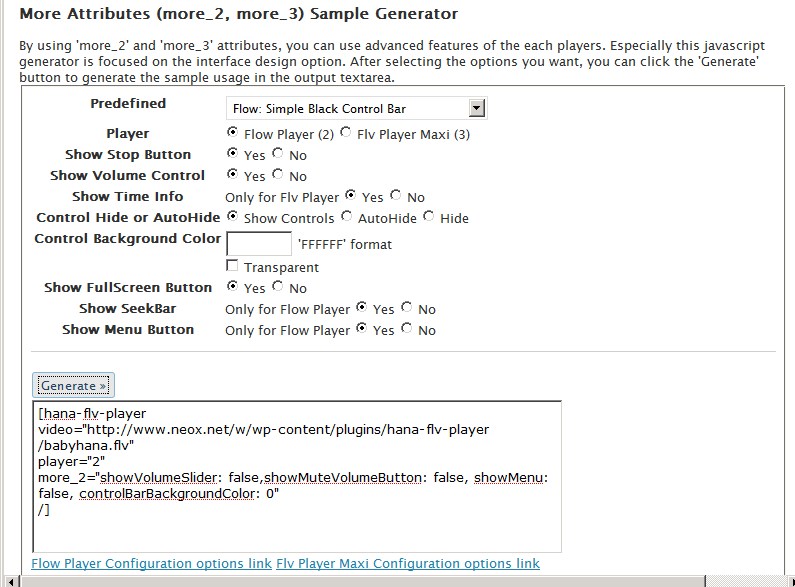
By using ‘more_2’ and ‘more_3’ attributes, you can use advanced features of the each player. There are tons of other options for the customization. You can use most of the options through these attributes. You can start testing by using the javascript generated provided in the settings menu.
It is mainly focused on the interface design option. After selecting the options you want, you can click the ‘Generate’ button to generate the sample usage in the output textarea.
Here are the examples from the predefined samples.
Flow: Simple Black Control Bar
[hana-flv-player
video="http://www.neox.net/w/wp-content/plugins/hana-flv-player/babyhana.flv"
player="2"
more_2="showVolumeSlider: false,showMuteVolumeButton: false, showMenu: false, controlBarBackgroundColor: 0"
/]
Flow: Controls over Video with Auto-Hide
[hana-flv-player
video="http://www.neox.net/w/wp-content/plugins/hana-flv-player/babyhana.flv"
player="2"
more_2="showVolumeSlider: false, controlsOverVideo: 'ease',controlBarBackgroundColor: -1, controlBarGloss: 'low' "
/]
Flow: Minimalist Look
[hana-flv-player
video="http://www.neox.net/w/wp-content/plugins/hana-flv-player/babyhana.flv"
player="2"
more_2="showStopButton: false, showScrubber: false, showVolumeSlider: false,showMuteVolumeButton: false, showFullScreenButton: false, showMenu: false,
controlsOverVideo: 'locked',controlBarBackgroundColor: -1,controlBarGloss: 'none',
usePlayOverlay: false "
/]
Flv: Showing Custom Logo
[hana-flv-player
video="http://www.neox.net/w/wp-content/plugins/hana-flv-player/babyhana.flv"
player="3"
more_3="top1=http://www.neox.net/w/wp-content/plugins/hana-flv-player/logo.png|30|20"
/]
Insert flv into template theme files (such as sidebar.php)
Okay, here is the function that you can use in the theme template files to show FLV movie. Basically you need to use hana_flv_player_template_call method. The method takes a single argument. The argument should be just the string of the attributes of the regular usage. Just copy below code into your theme template file and edit $hana_arg colored attributes accordingly.
<?php<|$styles>|>
if<|$styles>|> (function_exists<|$styles>|>('hana_flv_player_template_call')){
	$hana_arg="
video='http://www.neox.net/w/wp-content/plugins/hana-flv-player/babyhana.flv'
player='2'
width='180'
height='150'
more_2=\"showStopButton: false, showScrubber: false, showVolumeSlider: false,showMuteVolumeButton: false,
showFullScreenButton: false, showMenu: false, controlsOverVideo: 'locked',controlBarBackgroundColor: -1,
controlBarGloss: 'none', usePlayOverlay:false \"
";
	echo<|$styles>|> hana_flv_player_template_call($hana_arg);
}
?><|$styles>|>
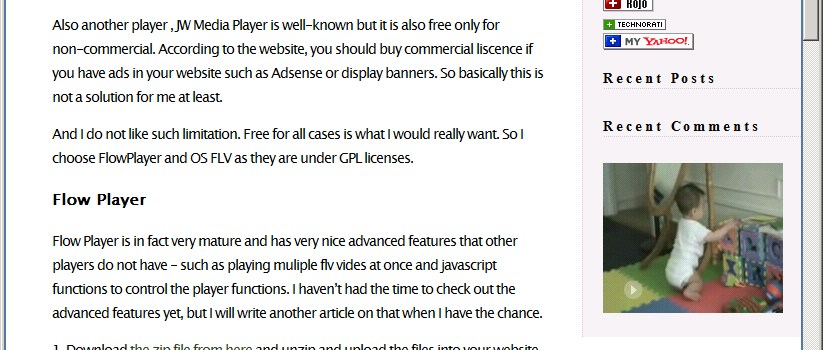
And here is the screen capture image showing FLV movie in the sidebar.
Let me know if you have any question.
Hi Hana,
Nice little plugin thanks. I’m wondering if you can help with this though.
I want the player in the sidebar, and be able to use custom fields to set the video it plays. I have a field called “video”, but I’m no php guru, and I can’t figure out how to make the video I enter into the custom field, show on that page.
I am getting a parse error.
This is the line in the code I’m having a problem with.
video=’http://www.mydomain.com/video/$key=’video’; echo get_post_meta($post->ID, $key, true)’
javascript:document.tcommentform.submit();
Can you help?
You should announce that one needs AC_RunActiveContent.js together with AC_OETags.js in order to get your plugin to function properly!
Besides that, Player #1 would not work in any browser i tested..
This is a great plugin! Works perfectly, very easy to use and does almost everything that I want… thanks!
Excellent work, as usual. I notice that your Thickbox/Lightbox plugin (or whatever you’re using to show large versions of embedded pics) does not blacken the background page, as is usually the case. Which plugin are you using and in which of its file did you make the modification?
@BDF, Thank you for the comment. I know . I found that my lightbox is not working few days ago. But I am not sure which WordPress plugin affected the lightbox to fail. I will need to check. Are you experiencing the same issue? I don’t think this is related to Hana Flv Player, but I will check again.
OK, I just upgraded to v2.2 which supports wmode = transparent . Basically it will allow overlay of other higer z-index objects. And I have a new website for wordpress plugins.
Please visit my support forum site for any questions Hana Flv Player Plugin Forum. I am closing the comment now. Thank you everybody!
Hana Flv Player Plugin Forum.