V.1.5 (1/16/2009) : There was issue with the form and textarea tag . It is fixed now. Also, there is a ‘Remove All’ button now that you can remove all code entries if you have any issue.
Inserting some javascript or Html codes in the middle of an article is not an easy task. It’s hard to copy and paste bunch of codes into the article whenever you write an article. Sometimes, the code breaks and doesn’t work as intended because WordPress encodes HTML entities.
So I decided to come up with the plugin that will help me insert that AdSense or Paypal Donation code into the middle of article.
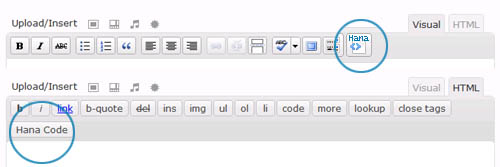
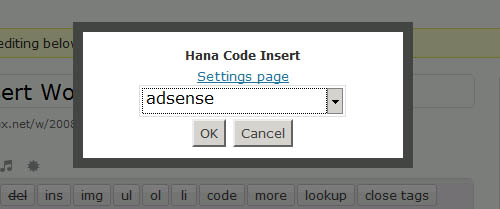
Now with my plugin, Hana Code Insert, you can easily insert any complicated HTML and JAVASCRIPT code or even custom PHP output in your WordPress article. Useful for adding AdSense and Paypal donation code in the middle of the WP article. You can manage multiple code entries.
After the plugin installation, you would setup the HTML or Javascript entries in the ‘Hana Code Insert’ Settings menu. Simply define a unique name and paste the complicated codes copied from AdSense or Paypal into the textarea. Then click on the ‘Create a new entry’ button.
After the creation, you can find that the newly added entry is shown in the bottom. Copy the usage code example and insert it in your article. That’s all.
Basically, you can place the specific tag element [hana-code-insert name='...' /] in your wordpress article to show the codes. The ‘name’ attribute is mandatory where you use the name of the code entry that you want to show.
For example, after you setup a code entry in the admin Settings with the name ‘AdSense’, you can invoke the code by using below element in your article.
[hana-code-insert name='AdSense' /]
Below is the Admin Settings (Options) Screen for ‘Hana Code Insert’. Four code entries are defined.
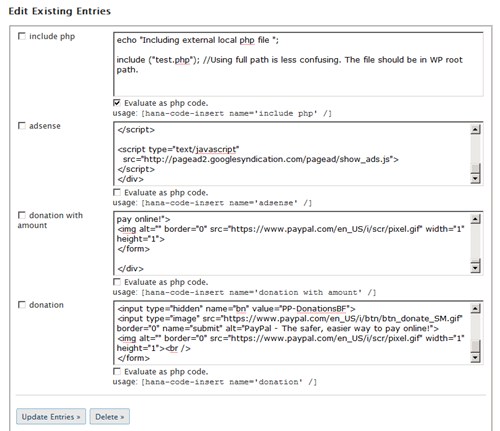
Here are the actual working samples.
[hana-code-insert name='donation' /]
[hana-code-insert name='donation with amount' /]
[hana-code-insert name='adsense' /]
Now this is an actual example showing the current local time. If you refresh the page, you can see that the time changes and reflecting the latest time. This is not javascript, but created by PHP codes inserted in the middle of this blog! (Note that if you have Super Cache plugin installed and enabled, this PHP code may not work correctly.)
Result
Here is the actual code used when setting up in the Settings/Options page with name “php example”.
print<|$styles>|> "<div style='border:1px dotted red; padding: 5px;'>";
print<|$styles>|> date<|$styles>|>("m/d/Y H:i:s");
print<|$styles>|> "</div>";
And here is the text inserted in the middle of the article.
[hana-code-insert name='php example' /]
If you have any question, leave in the comment section.
Thank you.
Hi:
We bought Email Marketing 5.0, created the forms and pasted the HTML code generated by EM into one of our pages in WordPress ver 2.6 in the HTML section of the editor.
The issue is that the captcha image in order to submit the fomr is not displayed. I think might have to do with WP editor.
Any clues.
Thanks,
Charles
charles, are you actually using my plugin and having problem?
If you see your test html output, ampersand and double quotes are transformed into corresponding HTML entities by WordPress. If you actually use my plugin, this problem can be fixed.
<script>
var url = "http://www.jurisad.com/em/admin/resources/form_designs/captcha/index.php?c=" + getRandom(1,1000)+ "&ss=" + SetSID();
document.write("<img src='" + url + "' alt='img'/>“);
</script>
Hanna:
Thank you so much for the reply.
When I posted I have not installed yet your plugin. Now it is installed and everything working fine.
Thanks again.
Excellent plugin.
Charles
I am glad that my plugin helped you. Thank you.
Good thinking. This is something I have had the need for a lot lately. I am going to download this and give it a whirl.
Have you tested this on WordPress MU by chance?
Hi,
at first – thank you for a great plugin for WordPress! I have one one problem, small problem i hope:)
I need use a PHP code. I tried use it by your example, but without succes. Can you help me? How i can use htis code:
It was OK, when i used only this part:
print wp_forecast(“A”);
But how i can use full of this PHP code?
Thank you for answer!:)
Marek
Hi
Thanks for the plugin.
When I inserted the 3rd form, it won’t let me update or delete any of the code in the forms. I tried de-activating, and reactivating. Tried deleting the forms several times.
Any ideas?
Thank you.
@LeslieTP. Okay, with v1.5 now, the issue is resolved. Please overwrite existing Hana Code Insert plugin folder with the new version.
Hey there,
Having a bit of a problem with the plugin. I’ve used it on one page and it has made the content of the page not centered anymore. The site looks right, it’s just left-aligned instead of being centered. Any ideas?
Hi Hana,
Thanks for taking the time to create this plugin. After i download it and open the file (on a mac) it opens up in text wrangler as coding. How do I get to open it as a form like the screenshot you provide?
Thanks!
Dara
THANKS!!! I’s been 3 hours now since i have been pulling my hair out because my html code would not display properly. Now it works perfectly. Thanks
You describe use in ARTICLE. Can that apply to PAGE?
No this is only for Blog article, not for PAGE. You can edit the template files and add the coding directly into the file easily.
Tried in both PAGE and POST, without and with $eval_php=true;
PHP code merely appeared (most of it). Should I be doing a line by line “print”, like your
print “”;
?
AND thanks for your fast response.
I should have referred to your
Here is the actual code used when setting up in the Settings/Options page with name “php example”.
above, as #14 did not appear as I had intended.
Hey Hana,
I really like your plugin. Thank you for sharing!
I have a question for a specific development.
I would like to use this plugin for a clients website (WordPress as a CMS) and I want to give my client a very easy tool to use HTML-code snipets without knowing any HTML-Markus.
Your plugin is an easy way to include HTML to the content of a website, but I think the the syntax is quite more complicated the necessary.
I try to change the program code and the result is that I can use the following syntax:
*name=mycode*
instead of
[hana-code-insert name=’mycode’ /]
Isn’t it more easy to use?
I would like to know you can change the plugin code so that I can use the following syntax:
#code:mycode#
or even better would be:
#mycode#
I think I could tell my client not to use the # character.
If you can do that please contact me and tell me what it will cost.
Best regards,
Sebastian
Hi! Love this plugin so much and would like to donate, however noscript brings up an xss issue when I click donate, could you email me your paypal email addy pls? Thx so much again 🙂
Thank you Sebastian and Halo, If you think any kind of improvement is needed, just let me know.
Thanks for this plugin.
Question: How can I implement this into my templates?
I’d like to use it inside header.php so that specific code is inserted in every page/post
Juergen
Juergen, Thank you for using my plugin. However, I don’t think my plugin is appropriate for that kind of task. But I am just thinking that I can create
1. a function to be used in the template files and shows a specific code entry item.
2. a function shows one random code item from the list.
And you can insert this function to the specific location of the template.
What do you think?
Big thanks for your plugin, it works great.
I have only small problem with position of inserted window. If you look on my site for pgnviewer, you select some play for playback and klick for autoplay or for next move in play – this inserted program does switch (scroll) every move to top again. It is not big problem on 22 inch monitor, but on 19 Ãnch monitor is it not really usable for playback. How can i fix this problem, plz ?
I want to use your plug-in but WordPress.org says it’s not yet been tested with 2.8.4. Any update on testing it with this new version of WP?
Thank you!
A.
For me it works fine with the newest version! 🙂
Basically 2.8.4 version is maintenance version and I believe Hana Code Insert will work fine, so you can just download and use it. However, i will check and update the status. Thank you.
Dear Hana:
Do your plugin works witn WP-MU 2.8.4a?
We installed the plugin, inserted the code (which is used to display a form). The form is displayed correctly, I can fill all fields, but once I click on Send, it is asking to enter an email address, which but it was already entered.
I have the plugin installed in other WP sites and it works fine with the same form code. This is the only WP-MU installation I have.
Any clues?
Thanks,
Charles
charles, I am sorry but I never tried WP-MU version before. And my plugin is not developed for MU version.
Hana,
We love your plugin. It was very easy to implement and we’re going wild with it.
Any way to incorporate it into the Text Widget for the sidebar, or in the sidebar.php?
Best wishes,
Mallory
It is not supported at this time. But,It’s a good idea to use Hana Code Insert in the sidebar widget. I will review on that, mean while if you want to use the Hana Code Insert in the sidebar.php, blow php snippet will do the trick, just change ‘key’ to your defined entry key.
< ?php global $hana_code; if ($hana_code != null) { echo $hana_code->hana_code_return("[hana-code-insert name='key' /]");}
?>
Hana code insert is upgraded to v2.2 , but the Text Widget function is not implemented yet. Probably in the next version soon.
And Hana Code Insert Plugin home page is moved to a new home. Hana Code Insert.
Also visit the
Hana Code Insert Forum
The comment is now closed. Thank you everybody.