June 12, 2008

Hana Code Insert WordPress Plugin

Filed under: WordPress — HanaDaddy @ 5:32 pm

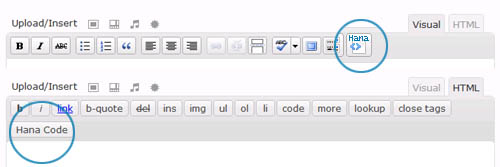
Inserting some javascript or Html codes in the middle of an article is not an easy task. It’s hard to copy and paste bunch of codes into the article whenever you write an article. Sometimes, the code breaks and doesn’t work as intended because WordPress encodes HTML entities.

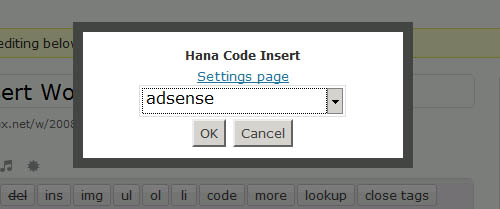
So I decided to come up with the plugin that will help me insert that AdSense or Paypal Donation code into the middle of article.

Download Hana Code Insert Plugin v1.0

(more…)

June 7, 2008

Sarah flvtools2 Helper for Windows - embedding Metadata into FLV

Filed under: Software — HanaDaddy @ 2:32 pm


If you want to provide streaming video service (For example, seeking any position in the video file) using Flash video, you need to embed Metadata in your flv data file.

The most well-known free tool is ‘flvtool2′ which was created by Norman Timmler (http://www.inlet-media.de/flvtool2) .

It’s pretty easy to use. You just have to type the command with -U option 'flvtool2 -U sample.flv' in the Windows command console.

However, if you have multiple FLV files to work on, this can be rather boring repetitive work. Yes, you may create a batch file and execute them all at once, but still the task requires too much manual typing.

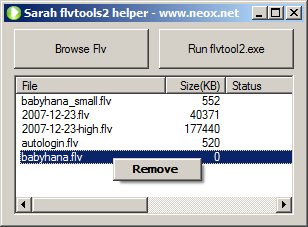
So I decided to create a simple front GUI frontend to embed Metadata for the multiple flv data with few clicks. And, here is my SarahFlvtool2. It is a Windows GUI helper for flvtool2.

Download ‘Sarah Flvtool2 Helper’

(more…)

June 1, 2008

Virtual Dimension - Virtual Desktop Manager with Transparency Support

Filed under: Software — HanaDaddy @ 5:50 pm

Virtual Dimension

You are using too many softwares running at the same time and you feel that you need a bigger monitor. Well before buy that new monitor, you might want to try Virtual Dimension first. This is a SourceForge hosted free GPL licensed virtual desktop manager. You can manage multiple virtual screens as many as you want .

Actually Virtual Dimension gives you full control over the how to manage and process applications, I was just surprised and never use any other virtual desktop manager.

Some of the nice things that you can with Virtual Dimension are

  • You can move application around between virtual desktop so easily by moving the icon from one desktop to another
  • You can easily make the application to show in all desktop by right click on the icon and click on “All desktops” menu. For some applications, like application launcher, you will need to access from all desktops.
  • It comes with a very nice transparency function. You make the windows transparent! By using the short cut key, you can easily turn on and off the transparency. Or you can save the settings so it is transparent whenever you execute the application. So great!

(more…)


40 queries. 0.343 seconds. Powered by WordPress