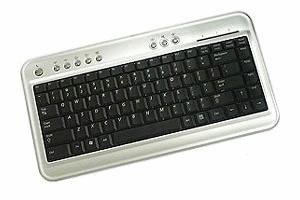
So here is my finding. BTC 6100c . I use quite number of desktop applications at work which makes me moving my right hand and arm around alot between Mouse and Keyboard.
I searched some ergonomic keyboard and mouse and realized that there are mini keyboards(88, 89 keys) shorter then the regular Keyboard with 101 keys in length.
Believing that shorter keyboard will help relieve the pain, I searched Internet forums and shopping sites for the best mini keyboards. And BTC 6100c satisfies my requirements.
- The key layout must be similar to the notebook key layout. – Some mini keyboards has very awkward placement of keys for backslash ” , windows , and control keys. I was able to find some keyboards that has layout exactly very similar to the notebook keys, but they cost more than $100.
- They must be scissor design keys – Just like notebook keys.
- The price must be less than $30. I don’t want to spend fortune on a keyboard.
The price was reasonable $19.99 with extra 7 dollars for shipping and tax. USB, mini, scissor action keys. It’s perfect for me.

I know. BTC-6100C feels cheap. But it’s not really bad if you looking for bargain. If you want better quality, try ‘Kensington Slim Type’ keyboard. I bought it and use at home and it’s better quality than 6100c. But it’s not a mini keyboard and it’s not full length keyboard either. It’s about $30. Still it’s a very good price. Kensington Slim Type Keyboard – PC ( 64365 )
However there was a very minor problem with the key layout. You see, I mainly use MS Outlook all day and use the DEL and HOME keys frequently to manage the emails. So the placement of DEL and HOME keys must be located in the most convenient place. And the convenient position is top right corner of the keyboard where I can directly access from the mouse easily.
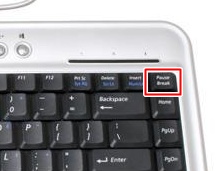 But there is PAUSE/BREAK key at the perfect location. And the DELETE key is located 2 keys to the left from the PAUSE key. I was trying very hard to get used with the layout, but it was absolutely uncomfortable!
So I began searching the Key Mapping program and forums. But all of the softwares were not able to handle the PAUSE KEY remap.
These freeware keyboard remapping tools are basically showing the registry scan code values in GUI and help you easily edit them.
Some of them are
- KeyTweak – Not bad
- MapKeyboard – Intuitive interface. Simple , but .NET is required (2.0?)
- SharpKeys2 – For me, this is the best since it was showing the correct scan codes so I was able to compare with the actual registry value. Unfortunately, Pause /Break Key remap requires you to actually touch the registry manually.
Ok, I will explain how I got the PAUSE key working as DEL key.
Under the Windows XP, scan code mapping can be stored into the registry and keyboard mapping can be changed easily under
HKEY_LOCAL_MACHINE\SYSTEM\CurrentControlSet\Control\Keyboard Layout
You can find the detailed keyboard scan code layout information from the Microsoft website
(Search scancode.doc in Google Website)
Generally, a scan code can be represented as 2 bytes binary data. Caps Locks scan code is E0_3A. By listing the scancode pairs (original against the new scan code) in the above registry key, windows remap the keyboard layout.
However, it is not true for the PAUSE key.
- Pause Key generates “E1 1D 45 E1 9D C5” scan code. That is quite long, HUH?
- Also when the PAUSE is pressed with ALT or CTRL , they generate E0_46.
I decided to experiment with the registry scan code mapppings. First I added the conversion using the first 2 bytes from the PAUSE key scan codes (E1 1D) to be converted as DEL key ( E0 53 )
1 2 3 4 | Windows Registry Editor Version 5.00 [HKEY_LOCAL_MACHINE\SYSTEM\CurrentControlSet\Control\Keyboard Layout] "Scancode Map"=hex:00,00,00,00,00,00,00,00,02,00,00,00,53,e0,1d,e1,00,00,00,00 |
pause_to_del.reg : download and double click to update the scan code entry in your registry. Please note that this file will reset any mappings you already have set.
But strangly, NUM LOCK event is also occuring when I press “Pause”. Since I will not use NUM LOCK KEY at all ( I don’t have number pad anyway), I will add extra mapping entry to convert NUM LOCK event to be converted as “NO EVENT”.
Also I realized that in order to Ctrl + Alt + Del working properly , I need to add conversion for E0_46 => E0_53.
These two additional scan code mapping entries can be added easily with SharpKeys. Make sure you click on the “Write to registry” button and reboot the machine to make the changes effective.
Below is the final output of SharpKeys.
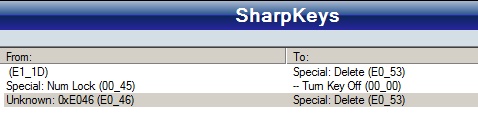
So, basically you will need to give up NUM LOCK function in order to remap PAUSE Key. But it’s possible to remap.
Also this PAUSE key can be used to setup to trigger any two key events for a single key stroke, too.
Here is the final reg entry.
1 2 3 4 5 | Windows Registry Editor Version 5.00 [HKEY_LOCAL_MACHINE\SYSTEM\CurrentControlSet\Control\Keyboard Layout] "Scancode Map"=hex:00,00,00,00,00,00,00,00,04,00,00,00,53,e0,1d,e1,00,00,45,00, 53,e0,46,e0,00,00,00,00 |
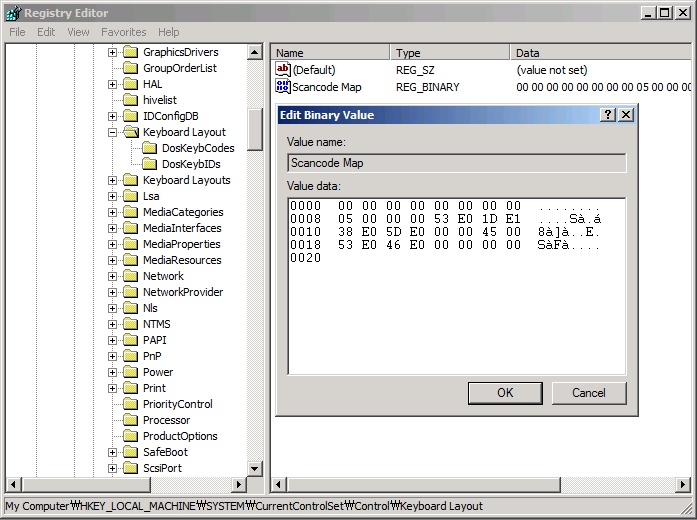
And this is the file final.reg.
Try to use right click and select ‘Save Link As’.
Thank you for visiting Hana & Sarah’s Freeware Blog
Have fun!
11/17/2011 : I tested with Windows 7 and it works too. Using only Sharp Key would not work because it does not give you the option to select ‘E1_1D’. So you would have to run the registry file that I provided in the article to make this work. Or you can manually edit the registry entry. Thank you.
Hi,
I have a question which i do not know if you can help. I have recently bought a simple 2 button presenter mouse. However, the mouse is being tied to the ‘pg up’ and ‘pg down’ button. I do like to map the button to a ‘left click’ mouse.
Disappointingly the freewares i got on the internet, do not map to ‘left click’ mouse. Can you help?
A million thanks!
Hi,
thanks for this great write-up. I am considering getting the BTC 6100. Could you check which code Sharpkeys shows when you press the FN key in the lower left-hand side of the keyboard? I am wondering whether it can be remapped.
Thanks
Christian
Yes, BTC6100 is cheap but you can try a better ones. BTC6100 is too cheap and does not respond well when you type fast and using several keys at the same time. By the way, I will check on the keyboard key when I get to work.
@Christian . Bad news . The ‘FN’ key at the lower left hand does not generate any scan code when I tested with Sharpkeys.
Excellent fix for the poor laptop DEL key placement.
Only issue is how to make the new DEL key have the typematic feature of the old delete key. (where you hold it down and it continues to delete characters)
Thanks.
Also, I have a possible great idea if someone can figure out how:
Home, End, Pg Up and Pg Down are all poorly positioned on laptops. If someone can write the code that can allow the arrow keys a double press command (like the double click on a mouse) where left arrow clicked twice rapidly is HOME, right arrow double clicked is END, and up and down arrows are page up and page down respectively. This would be an awesome little program, and very quick and easy for users to learn.
Hello, Thanks for the comment. Your suggestion can be easily implemented using AutoHotKey script. I am not good at it either, but it can be done pretty easily I believe. But creating an AutoHotKey script is not an easy task for regular users. I will try to gather some information when I have time.
Thanks to you, I’ve managed to remap my scroll lock to the Home and the Pause key to the End key
That whole num lock stuff was pretty confusing!!!
I use Vista on HP pavillion laptop
======BoF===========
Windows Registry Editor Version 5.00
[HKEY_LOCAL_MACHINE\SYSTEM\CurrentControlSet\Control\Keyboard Layout]
“Scancode Map”=hex:00,00,00,00,00,00,00,00,04,00,00,00,4f,00,1d,e1,4f,e0,45,00,47,00,46,00,00,00,00,00
=======EoF===========
Two girls, eh? Get your sleep while you can, you’re gonna need it! 😉 But daughters are pretty amazing when you’re older…
Please help me set my keyboard’s Right Alt key to work as a Pause/Break Key because I don’t have one on my Dell keyboard.
let me know exactly what file to edit and what to paste in it, thanks 🙂
Thanks for this helpful article. I needed Break key functionality, and I wanted to use my Application key (E0_5D). I found that while SharpKeys might not be able to map Pause, as you note, it is able to map Break, and I was able to do that fairly easily.
Basically, I just mapped Application (E0_5D) to Unknown (E0_46), which seems to be Break. I get Break functionality without having to do Ctrl+Application. Just pressing the Application key performs a Break.
So that was fairly simple to do – as long as I don’t need Pause (which I don’t).
Also, a minor point: I noticed when I was using SharpKeys 3.5 that the “From” and “To” are reversed from how they are in your screen shot. In 3.5 “From” is the actual key you press, and “To” is the functionality that will be performed. I noticed this is reversed from how it is in your screen shot. So that’s interesting. Maybe the software author reversed them in the newer version. Anyway, FYI.
P.S. Just found out that mapping the Application key to Scroll Lock (00_46) makes it work as Pause. Then, pressing Ctrl+Application creates a Break, just like Ctrl+Pause.
I appreciate your work and article which might give me some hope. I have a Dell Inspiron 15r and there is no pause/break key. I desperately need one as I am working with loops in VBA and have no way to stop them! Please help me set any key on my keyboardo work as a Pause/Break Key. I would prefer to use my PrntScr or my right ctrl or right alt. I have been reading about the scancodes so I was wonder what I could do!
Hello Chelsea
I suggest you to check this out http://en.community.dell.com/support-forums/laptop/f/3518/t/19285247.aspx
Still working in 2019 while remapping my new Logitech G513
Thanks
Thank you very much.
I have MSI GL75 9SD and in my keyboard “Break” was in “Delete” and “\” in “Right Alt”.
Thanks to you I don’t have to give my laptop back to the store 😀
Additionally, I removed the “Num lock” disable. Fortunately, the “\” sign was easily changed in KeyTweak.
@KONRAD
After all years, I am glad my posting is still useful for people out there. Thank you for your comment!