UPSRATE RSI STOCK BLOG FREEWARE DVD-CD PuTTY

February 20, 2008

Protect your secret data with TrueCrypt

Filed under: Software — HanaDaddy @ 10:37 pm

Download: http://www.truecrypt.org/downloads.php
It’s a freeware
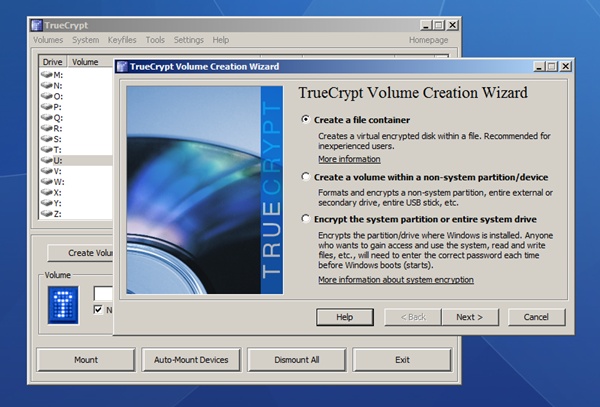
TrueCrypt - Create volume wizard There are some personal secret data in my hard disk that I don’t want anybody to see - such as diary. This is a perfect solution for me that once I create an encrypted volume data file, I can mount it as a virtual hard drive. Whenever I write or read the data into or out from the virtual disk, the TrueCrypt will encrypt or decrypt the data on the fly.

I used to think those softwares that encrypt or decrypt files are slow and would be uncomfortable to access data easily. But TrueCrypt is surprisingly fast, a lot more than what I expected. Probably, because it is using the physical memory space to do the calculation. I have saved a large movie file and played directly from the virtual drive, I was unable to notice any differences from when it was played from the normal hard drive.

Pros

  • The reading and writing speed is more than satisfactory as an encryption software.
  • Support all three major OS. Windows, Mac OS, and Linux
  • Portable so you can copy it into your USB and move all the data into the encrypted volume data. So even if you loose your USB stick, you won’t have to worry that someone might access your confidential data.

Cons

  • It takes a little time to learn how to use the software. Creating a volume data file may not be easy for a computer novice.
  • When you want to access the secret files, you need to mount the volume data file to access from the virtual drive. The process could be shortened somehow making it much simpler.

Make sure to visit Tutorial Page to start with TrueCrypt. It is necessary to read the webpage to learn how to create and mount volume data file as virtual hard disk.
February 18, 2008

Free Vista Flip 3D emulator - WinFlip

Filed under: Software — HanaDaddy @ 11:34 pm

Website: http://tokyodownstairs.blogspot.com/2007/11/winflip.html
Direct Download: http://www.tokyodownstairs.com/binary/WFlip042.zip

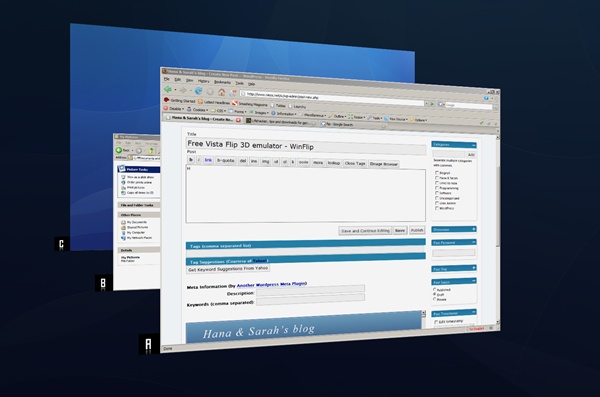
WinFlip in Action Here is another Flip 3D emulator for your XP.
This one is actually better than Shock Aero. (Here is my previous posting on Shock Aero. The Shock Aero has become too heavy and slow. It also requires serial number that you can get from the developer’s homepages. But it’s just an unnecessary extra step as a freeware.)

WinFlip is light and fast, it requires DirectX9.0c. But you should already have it in your XP.

Pros

  • It doesn’t require setup. You can execute after unzip.
  • WinFlip is light and fast.
  • Showing Alphabet letter besides each window to directly access it.
  • The short cut is Window + Tab but you can also trigger the Flip screen by mouse movement. If you make a circle movement with your mouse, the Flip screen is shown. That is very neat and kind of addictive. These setup can be changed from the options.

Cons

  • It’s unstable. If you open lots of windows and application, WinFlip becomes unstable and crashes.

If you love Vista’s Flip 3D, WinFlip maybe the best freeware solution for you but note that it becomes unstable after several hours. But let’s hope that they fix this problem soon. Until then, I decided to remove the winflip from the startup menu.

February 17, 2008

ToDoList by AbstractSpoon

Filed under: Software — HanaDaddy @ 12:11 am

Website: http://www.abstractspoon.com/
Direct download: http://www.abstractspoon.com/todolist_exe.zip

todolist by AbstractSpoon

Must be the best TODOLIST software there is (at least among the Freewares).

It provides almost all attribute fields such as start , due , end date, priority, time spent, category, status, and more to maintain daily jobs or large project easily.

Also, it provides Import and Export interface that you can move around your data easily between other spreadsheet applications or as a HTML page.

It is portable since you can start using it right away after unzip. You can copy the folder into your USB memory stick and bring it with you anywhere. Just make sure that you select to store data into an INI file instead of the registry when you start the app first time.

Another interesting function is that it supports multiple users through todolist file sharing and simple source control function. TO tell you the truth, I haven’t tried this function yet.

This may be more useful at your work instead of at home. But it’s worth to try it.

Also you may want to download Calendar plugin. It’s a DLL file that you can just copy into the same folder where ToDoList.exe is. After copying, restart the todolist.exe and access the Calendar plugin from the Tools menu.

Calendar Plugin in Action

February 14, 2008

Launchy

Filed under: Software — HanaDaddy @ 9:57 pm

Launchy with Black Glass Skin
Download from http://launchy.net. It’s a freeware.

Launchy is quite convenient and easy to use. The default shortcut keys are Alt + Space which can be easily changed from the option menu that you can access by right clicking on the border of Launchy.

It provides slick interface design which is skinable. Also, it is easy to add new executable location. You only need to define the parent folder in the Catalog menu and Launchy will scan all sub-folders and index them too. It is smart and self learning so once you executed ‘putty’ ssh by typing ‘pu’, it will show ‘putty’ as default entry next time you type ‘pu’. One thing that I didn’t like was that it consumes about 18 MB of memory. It is little too much for a simple application, but I guess it’s because of the graphic interface. But I couldn’t find better alternative.

Basically I like it because it’s pretty and smart enough to remember my favorite applications.

There are some similar free softwares introduced here at Lifehacker.com site. I did tried recently became freeware Enso. It is less intuitive (with no pretty graphics interface, showing only large bold letters on the left top corner) and hard to learn . Also it uses about 34 MB of memory. It was just not for me.

With the RocketDock and Launchy, I am in full control of my desktop.

February 13, 2008

Keyboard remap - Pause Break key as DEL key

Filed under: Software — HanaDaddy @ 12:48 am

btc 6100c So here is my finding. BTC 6100c . I use quite number of desktop applications at work which makes me moving my right hand and arm around alot between Mouse and Keyboard.

I searched some ergonomic keyboard and mouse and realized that there are mini keyboards(88, 89 keys) shorter then the regular Keyboard with 101 keys in length.

Believing that shorter keyboard will help relieve the pain, I searched Internet forums and shopping sites for the best mini keyboards. And BTC 6100c satisfies my requirements.

  • The key layout must be similar to the notebook key layout. - Some mini keyboards has very awkward placement of keys for backslash ‘\’ , windows , and control keys. I was able to find some keyboards that has layout exactly very similar to the notebook keys, but they cost more than $100.
  • They must be scissor design keys - Just like notebook keys.
  • The price must be less than $30. I don’t want to spend fortune on a keyboard.

The price was reasonable $19.99 with extra 7 dollars for shipping and tax. USB, mini, scissor action keys. It’s perfect for me.

However there was a very minor problem with the key layout. You see, I mainly use MS Outlook all day and use the DEL and HOME keys frequently to manage the emails. So the placement of DEL and HOME keys must be located in the most convenient place. And the convenient position is top right corner of the keyboard where I can directly access from the mouse easily.

Pause Key But there is PAUSE/BREAK key at the perfect location. And the DELETE key is located 2 keys to the left from the PAUSE key. I was trying very hard to get used with the layout, but it was absolutely uncomfortable!

So I began searching the Key Mapping program and forums. But all of the softwares were not able to handle the PAUSE KEY remap.

These freeware keyboard remapping tools are basically showing the registry scan code values in GUI and help you easily edit them.

Some of them are

  • KeyTweak - Not bad
  • MapKeyboard - Intuitive interface. Simple , but .NET is required (2.0?)
  • SharpKeys2 - For me, this is the best since it was showing the correct scan codes so I was able to compare with the actual registry value. Unfortunately, Pause /Break Key remap requires you to actually touch the registry manually.

Ok, I will explain how I got the PAUSE key working as DEL key.
Under the Windows XP, scan code mapping can be stored into the registry and keyboard mapping can be changed easily under

HKEY_LOCAL_MACHINE\SYSTEM\CurrentControlSet\Control\Keyboard Layout

You can find the detailed keyboard scan code layout information from the Microsoft website
(Search scancode.doc in Google Website)

Generally, a scan code can be represented as 2 bytes binary data. Caps Locks scan code is E0_3A. By listing the scancode pairs (original against the new scan code) in the above registry key, windows remap the keyboard layout.

However, it is not true for the PAUSE key.

  • Pause Key generates “E1 1D 45 E1 9D C5″ scan code. That is quite long, HUH?
  • Also when the PAUSE is pressed with ALT or CTRL , they generate E0_46.

I decided to experiment with the registry scan code mapppings. First I added the conversion using the first 2 bytes from the PAUSE key scan codes (E1 1D) to be converted as DEL key ( E0 53 )

1
2
3
4
Windows Registry Editor Version 5.00
 
[HKEY_LOCAL_MACHINE\SYSTEM\CurrentControlSet\Control\Keyboard Layout]
"Scancode Map"=hex:00,00,00,00,00,00,00,00,02,00,00,00,53,e0,1d,e1,00,00,00,00

pause_to_del.reg : download and double click to update the scan code entry in your registry. Please not that this file will reset any mappings you already have set.

But strangly, NUM LOCK event is also occuring when I press “Pause”. Since I will not use NUM LOCK KEY at all ( I don’t have number pad anyway), I will add extra mapping entry to convert NUM LOCK event to be converted as “NO EVENT”.
Also I realized that in order to Ctrl + Alt + Del working properly , I need to add conversion for E0_46 => E0_53.

These two additional scan code mapping entries can be added easily with SharpKeys. Make sure you click on the “Write to registry” button and reboot the machine to make the changes effective.

Below is the final output of SharpKeys.
Final registry entry shown with Sharp keys

So, basically you will need to give up NUM LOCK function in order to remap PAUSE Key. But it’s possible to remap.

Also this PAUSE key can be used to setup to trigger any two key events for a single key stroke, too.

Here is the final reg entry.

1
2
3
4
5
Windows Registry Editor Version 5.00
 
[HKEY_LOCAL_MACHINE\SYSTEM\CurrentControlSet\Control\Keyboard Layout]
"Scancode Map"=hex:00,00,00,00,00,00,00,00,04,00,00,00,53,e0,1d,e1,00,00,45,00,\
  53,e0,46,e0,00,00,00,00

And this is the file final.reg.
Try to use right click and select ‘Save Link As’.

Have fun!


46 queries. 1.678 seconds. Powered by WordPress