Easy Offline Microsoft Windows and Office Update
Posted by HanaDaddy in Business & Office tools, Software on May 24th, 2009
Are you getting tired of the constant MS Windows Update screen? Or You are not sure if you are running the latest bug patched version of MS Office suite? ‘Offline Update’ is the answer for you.
It is an easy and convenient utility that will download all the necessary Windows and Office Update and install them at once. It supports multi languages and even you can make ISO disk image or copy it to the USB memory stick.
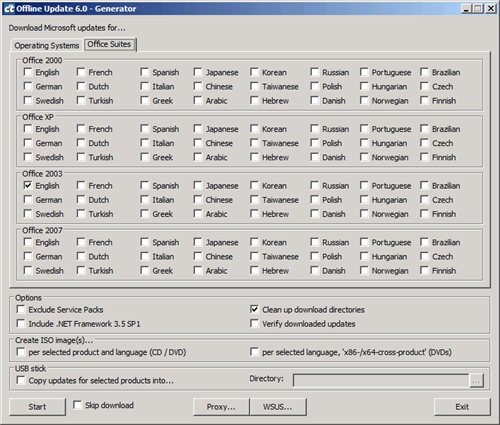
First download the zip file and unzip it to a drive with enough hard disk space. For your information, my total downloaded file size was about 500MB. Then execute the ‘UpdateGenerator.exe’ . Below window will open. As you can see , you can select the target language and version of Windows and Office Suites , then click on the ‘Start’ button. It will start download all the required updates which have not been patched. Once the download is completed, a pop up window will be showing to alert the download is completed.
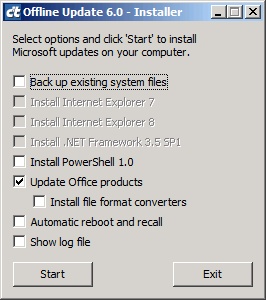
All the update files are in fact stored in the ‘client’ subfolder. Please move into the ‘client’ and execute ‘UpdateInstaller.exe’ to initiate the actual installation process. I only tested with Office Suite and had 17 updates patched which took about 30 mins. For me, my machine was only rebooted once after all the updates were patched, but you might want to enable the ‘Automatic Reboot and Recall’ if you are updating Windows since Windows Updates often require rebooting per each update.
Website: Offline Update Website ( Google Translation )
Download: Offline Update Direct Download
Restore or Completely Delete : double edged Recuva
Posted by HanaDaddy in Software, System Utilities on May 21st, 2009
Do you need to recover the deleteted homework or important office document? Please relax, we have Recuva.
Today, I am going to introduce ‘Recuva’ (supposedly pronounce it as ‘RECOVER’) . It is from the maker of the famous free software CCleaner, Piriform. Recuva is a freeware utility to restore the deleted files including the ones completey emptied from the Recycle bin.
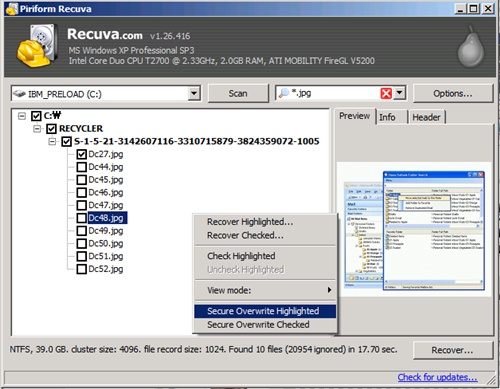
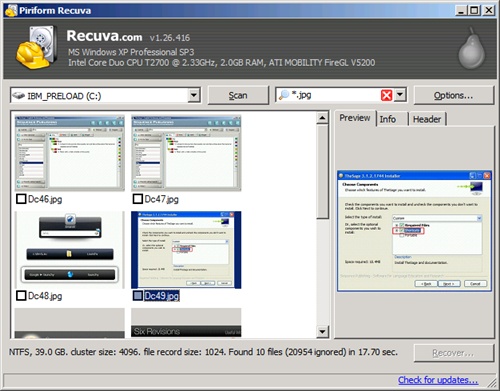
The interface is very simple and intuitive that anybody can perform the quick restoration. It provides three types of familiar interface , list view,tree view, and Thumbnails view. Of course , with the Thumbnails view, it shows preview for the image files. If you want to navigate using the folder structure, try tree view. When you want to recover files , select the files first and then right click to click on the ‘Recover …’ menu.
![]()

There is a search field on the top so you can easily search the file name or path.
The last item I want to talk about is the ‘Secure Overwrite’ function which is directly opposite function of ‘Recover’. It will completely delete the file, so the files won’t be recovered.
‘Recuva’ is FREE , fast , simple, easy to navigate. You can either RECOVER or COMPLETELY REMOVE the deleted files. I mean this is so simple but yet powerful , I would not want any other RECOVERY program!
Website: http://www.recuva.com/


Recent Comments