PuTTY : A Free Telnet/SSH Client

They used to charge high prices for the commercial SSH client software.(SecureCRT is one of them) Then this free SSH client was released in the Internet. And we are able to enjoy secure shell environment for free! Thanks to Simon Tatham. Below is the excerpt from the PuTTY homepage.

PuTTY is a free implementation of Telnet and SSH for Win32 and Unix platforms, along with an xterm terminal emulator. It is written and maintained primarily by Simon Tatham.

If you are a developer or a system admin , you may access to the UNIX server using telnet application everyday. Telnet uses a simple raw data transmission without encryption , so if you use telnet over the public Internet, your authentication data(Password) may be captured and viewed by anyone with the right tool and the motivation. It is very vulnerable and not recommended.

SSH (Secure Shell) is similar to telnet but it is very secure. It encrypts the data before the transmission, so you can rest knowing that your password is safe with you.
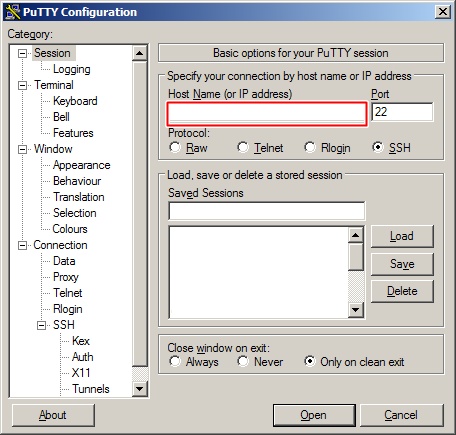
PuTTY first screen

When you first run the application, you will see the screen looks like above image. You can right connect to the SSH server right away by typing in the IP or domain name of the host in the HOSTNAME field and press Enter key.

There are various options and settings that you can change by using the items in the left pane. (Windows Color, Font size)

There are few settings that you may want to change before starting a session.
1. Backspace Key: By default, Control-?(127) is the Backspace key, but you may need to set to Control-H.(It depends on the server’s setting).
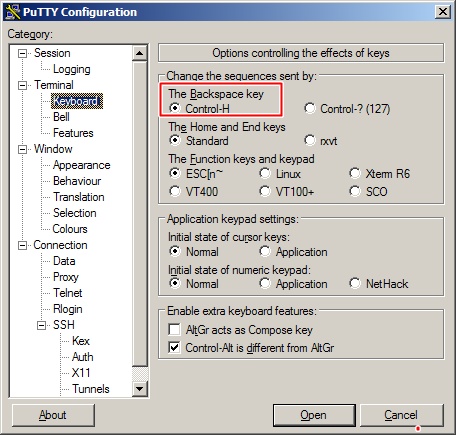
Changing Backspace Key value


2. Change the default number of row and columns. Usually people like to set to larger value than the defaults (24 Rows, 80 Columns) . Also, increase the lines of scrollback to a larger value (5000). This indicates the lines to keep in the screen buffer.
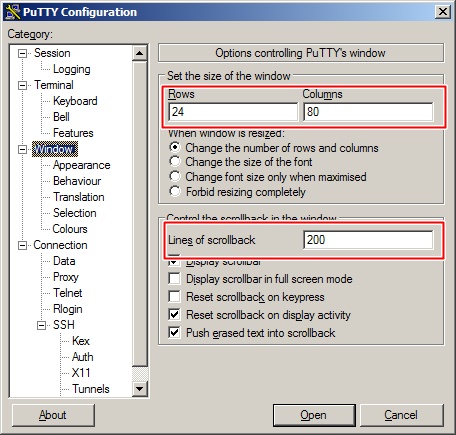
Change the number of rows/column/scrollback

You can update the Windows color , font color, and sizes for better view.

After updating the settings, save those settings ( session ) and easily load the settings later. First type in the unique name as the profile name in the “Saved Session” text field and click on the Save button.

Then the new profile name will appear in the list box located right below. Now you can simply double click the entry to load and connect to the server.
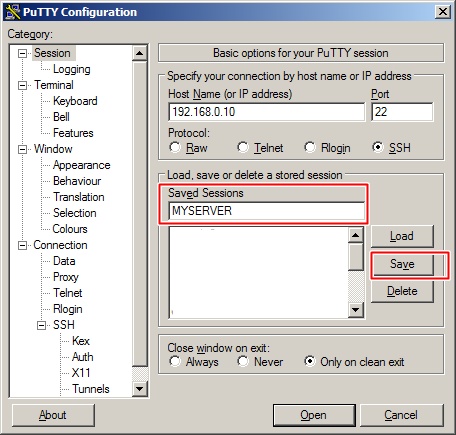
Saving Profile

Share and Enjoy:
  • Digg
  • del.icio.us
  • Facebook
  • Mixx
  • Google Bookmarks
  • MySpace
  • Reddit
  • Technorati
  • Twitter

, ,

My favorite listmania

Getting Started with Wordpress

$34.42
WordPress for Business Bloggers: Promote and grow your WordPress blog with advanced plug-ins, analytics, advertising, and SEO - I recently relocated my blog from Google Blogger to WordPress hosted on my own domain. As an IT consultant, I'm used to getting under the hood and mastering new concepts. However, when it comes to ...
$34.86
WordPress Theme Design: A complete guide to creating professional WordPress themes - I found the book very helpful with regards to creating a typical Wordpress theme that has a few additional needs beyond the standard themes. I just finished doing some contract work on a website buil...
$34.34
WordPress Complete: A comprehensive, step-by-step guide on how to set up, customize, and market your blog using WordPress - For $35, I expected something with far more detail and information. I'm a beginner to Wordpress, but I program in other languages. The book gave a bit of an overview, but in the end, I got what I re...
$19.79
Building a WordPress Blog People Want to Read - If you're looking for a basic book on creating a Wordpress blog, this is not a bad choice. It's well written and structured for beginners. The title, however, promises far more than the book delivers....
$11.95
Wordpress Entrepreneur: How To Setup, Customize & Use A Wordpress Website (Volume 1) - This book helps the novice learn how to set up WordPress on their free blog hosting website or their web hosting account. What is WordPress? It's a very popular open source blog publishing application...
$30.39
Professional LAMP : Linux, Apache, MySQL and PHP Web Development - This book only gives rudimentary coverage of MySQL or Apache.

Twenty one pages in the chapter for 'Advanced MySQL' -- really! 13 pages of this is a review of SQL, how to do queries, updat...
$29.69
Building Findable Websites: Web Standards SEO and Beyond - I'm a graphic designer with a background primarily in print design.

This is one of the first books on SEO I've read, so its hard to compare to others. But I found the book to be very rea...
$26.57
Professional Search Engine Optimization with PHP: A Developer's Guide to SEO - I've read a number of other resources on the subject of SEO, and this one is definitely the best I've encountered.

No one aspect of SEO is particularly technically complicated, its more ...
$34.65
Prioritizing Web Usability - Jakob Nielsen and Hoa Loranger paired together to create a book packed with the information necessary on what it takes to create a user-friendly Web site. Prioritizing Web Usability hits the center o...
$29.69
WordPress 24-Hour Trainer: Watch, Read, and Learn How to Create and Customize WordPress Sites (Book & DVD) - When I say I'm new to Wordpress, it's as if I'd been wrapped in cellophane, lying in a cardboard box, like a new item on a shelf. I only wish i'd found this book first but I don't think it was on the ...
  1. No comments yet.
(will not be published)
  1. No trackbacks yet.
Quick Coupons!
Abe's of Maine: Actually , if you buy a product more than $75, you can use FRIEND10 coupon code to get extra $10 off!